What you get
What a directive authorizes
A directive tells the contractor: proceed with this changed scope now, and we will execute the formal change order to cover it after the fact. It is written authorization to act before the contract is formally amended.
Why timing matters
A directive needs to be documented the moment it is issued — not at the end of the day, not in the weekly report. The date and time on the directive establish when the changed scope was authorized, which matters for schedule impact claims.
Why location matters
A directive that says 'extend the grind' is ambiguous without the station. A directive pinned to GPS coordinates at Sta. 42+50 is unambiguous — it applies to that location, that scope change, that crew on that day.
Who can issue a directive
The owner, the engineer of record, the owner's representative, or the agency inspector on a public works project. The contractor's super or PM cannot issue their own directive — it has to come from the authorized party on the other side of the contract.
The paper trail to the change order
The sequence: changed condition → RFI → directive to proceed → cost proposal → change order executed. The directive is the link between the field condition and the executed contract modification. Without it, there is a gap in the paper trail.
Why not spreadsheets, sticky notes, or memory?
- A directive noted in a daily report is easy to miss when the change order negotiation happens 60 days later.
- A verbal directive texted to the foreman has no date, no GPS location, and no authorizing party's name — which makes it essentially useless for a claim.
- Directives in a spreadsheet row have no connection to the photos of the changed condition or the plan section that was modified.
- When a project has 50+ directives across a 5-mile corridor, a spreadsheet cannot show the PM which segments have unresolved change order exposure.

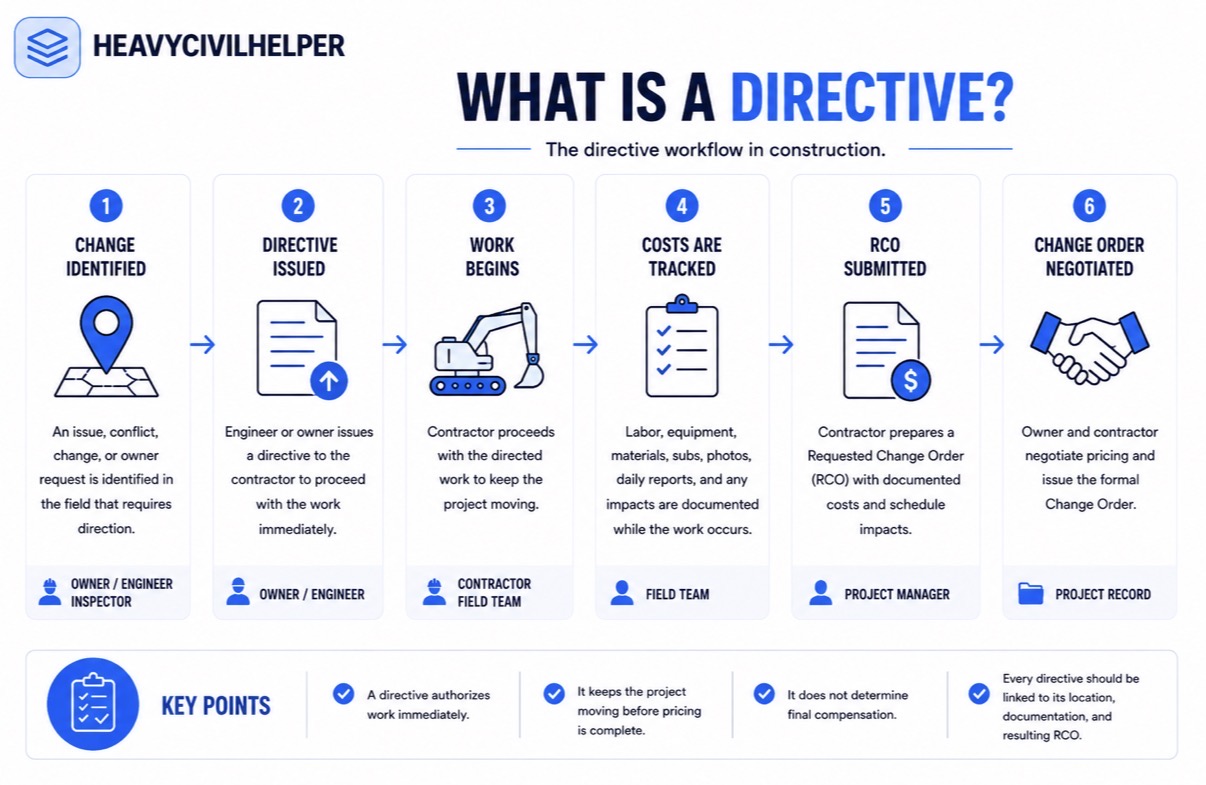
The directive sequence: from field condition to change order
- 1
Changed condition identified in the field
The foreman encounters something that does not match the plan — an existing utility in an unexpected location, a subgrade condition worse than specified, a design conflict revealed during construction. Work stops at that location.
- 2
RFI submitted to the engineer or owner
A formal question is submitted documenting the conflict, the field condition, and what clarification or direction is needed. The RFI is timestamped at the GPS location of the conflict.
- 3
Directive issued to proceed
The engineer or owner representative responds — sometimes verbally first, then in writing — directing the contractor to proceed with a specific approach to resolve the conflict. This is the directive. It needs to be documented immediately at the location it applies to.
- 4
Work proceeds under the directive
The contractor performs the changed scope. The directive is the authorization. If the contractor performs changed work without a directive and later asks to be paid for it, the lack of written authorization from the owner is the first argument against the claim.
- 5
Cost proposal and change order executed
The contractor submits a cost proposal for the changed work. Negotiation follows. The executed change order closes the loop — the directive paper trail supports the contractor's position on scope and cost.
Common directive types on civil and public works projects
The following directive types appeared on a real 5-mile public works roadway project tracked in HeavyCivilHelper — 50+ directives across the alignment, each pinned to the GPS location where the scope changed.
ADA ramp revisions
Inspector or engineer directs a revised ramp geometry at a specific intersection. The curb layout changes, sometimes the drainage changes with it. Needs to be documented at the ramp GPS location with the revised design.
Median configuration changes
The median design at an intersection is changed during construction — a raised median removed, a turn pocket added, a protected left-turn phase accommodated. The scope change is at a specific station.
Additional tree removals
Utility conflict, grade conflict, or sight distance issue requires a tree removal that was not in the original contract. The location determines which permit and which cost code.
Telecom and utility additions
A utility agency representative requests an additional conduit run, a splice vault at a specific manhole, or a grade adjustment at a crossing. The directive comes from the utility agency contact — and needs to be timestamped.
Pavement section upgrades
Inspector directs an upgraded pavement section at a localized subgrade failure. The station where the failure exists determines the change order scope.
Bus pad and stop infrastructure
Transit agency or city requests a bus pad, shelter foundation, or curb configuration change not in the original plan. Location-specific and often tied to an existing utility adjustment.
How HeavyCivilHelper handles directives
Directive is a native record type in HeavyCivilHelper — not a custom field or workaround. When a verbal directive is issued in the field, the superintendent does not need to wait until they are back at the office to log it.
- Open the app at the GPS location where the directive was issued
- Drop a pin and select Directive as the record type
- Fill in: description of the changed scope, who issued the directive, verbal or written
- Attach photos of the field condition or any sketches provided
- The directive is timestamped at the moment of creation — GPS coordinate included
- The PM sees the new directive on the project map immediately from the office
- Status tracks from Open through Incorporated into a change order through Closed
When the project has 50 directives across a 5-mile corridor, the map shows where change order exposure is concentrated — which segments have the most unresolved directives before the monthly cost meeting.
Common questions about construction directives
- What is a directive in construction?
- A construction directive is a written or verbal instruction from the owner, engineer, or owner's representative that tells the contractor to proceed with changed or additional work before a formal change order is executed. The directive authorizes the contractor to act — and creates the paper trail that supports the change order that follows. In HeavyCivilHelper, a directive is a native record type: a GPS-pinned record logged at the location where the scope change applies, with a timestamp, description, and any supporting attachments.
- What is the difference between a directive and an RFI?
- An RFI (Request for Information) is a question the contractor asks the designer or owner — about a plan conflict, a changed condition, or a clarification needed before proceeding. A directive is an instruction from the owner or engineer telling the contractor to proceed, often in response to a changed condition the RFI surfaced. The RFI asks a question; the directive is the authorized answer that involves a scope change. Both need to be documented at the specific location they apply to.
- What is the difference between a directive and a change order?
- A directive authorizes the contractor to proceed with changed work before the formal change order is approved. A change order is the executed contract modification that documents the agreed scope, cost, and schedule impact. The typical sequence is: changed condition identified → RFI submitted → directive issued to proceed → change order negotiated and executed. Directives protect the contractor's right to be paid for the work; the change order is how they actually get paid.
- Does a directive have to be in writing?
- It should be, but it often is not in the moment. Verbal directives happen all the time on construction projects — the inspector walks by and says 'extend the grind another 20 feet' or the engineer calls and says 'change the ADA ramp design at this intersection.' The critical step is converting that verbal instruction into a written record immediately, with the date, the location, the description of the changed work, and the name of the person who issued the instruction. That written record is what supports the change order.
- What happens if a directive is not documented?
- If a directive is not documented at the time it is issued, the contractor may perform the work and then be unable to support a change order — because there is no dated record showing that the owner or engineer authorized the changed scope. 'He told us to do it' without documentation is a claim, not a contract right. Directives need to be logged at the moment they are issued, at the location they apply to, with enough detail to show what changed and who authorized it.
- How does HeavyCivilHelper handle directives?
- Directive is a native record type in HeavyCivilHelper — not a workaround or a custom field. When a verbal directive is issued in the field, the superintendent opens the app, drops a pin at the GPS coordinate where the scope change applies, selects 'Directive' as the record type, fills in the description, and submits. The directive is timestamped, GPS-stamped, and visible to the PM and the whole project team immediately. It stays open on the map until it is incorporated into an executed change order and closed.
- What is a Field Directive vs a Construction Directive vs an Engineer's Directive?
- These terms are used interchangeably across different contract types and agencies. A Field Directive (FD), Construction Directive, Engineer's Directive, Owner's Directive, and Work Directive Amendment all refer to the same concept: a written instruction to proceed with changed work before the change order is executed. HeavyCivilHelper uses 'Directive' as the generic term covering all of these. The specific form name on your contract does not change how the record should be documented — date, location, description, and authorizing party.
See it on a real map
The interactive demo loads sample data so you can click through it in under a minute.
Related
Directive vs RCO in Construction
The full breakdown of when a directive becomes a request for change order and how the two relate.
What Is an RFI in Construction?
How RFIs work — often the precursor to a directive when the field question reveals a scope change.
What Is a Construction Change Order?
How change orders work and how the directive paper trail supports the change order negotiation.
Public Works and Heavy Civil
How HCH handles directive tracking on public works corridor projects with multi-agency coordination.
How to Track RFIs in Construction
Practical guide to RFI tracking — the step that usually precedes a directive.